Not ready to give a price?
Book the job as To quote when it needs assessing first. Record an estimate when you have one, or mark work as free of charge where appropriate.
Jewellery and watch repair management
Keep condition photographs, work required and progress with each repair, from booking-in to signed collection. Find the latest update when a customer asks whether their ring is ready.
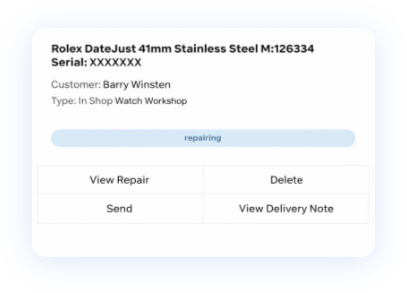
Record the item’s condition separately from the work required, with photographs of any damage. Staff can check what was noted when the piece arrived.
Book the job as To quote when it needs assessing first. Record an estimate when you have one, or mark work as free of charge where appropriate.
Keep the repair’s location, status and updates on the job. The activity history shows who added an update and when, so another member of staff can pick up the conversation.
Record repair payments and their methods against the job. Your team can refer to the payment history when the customer comes back.
Mark the repair ready for collection, then capture the customer’s collection signature when it is handed back. Keep the completed repair receipt with the record.
Select the customer, describe the item’s condition and required work, and add photographs.
Enter an estimated cost or mark the job To quote while the work is assessed.
Update the location and status, add progress notes and record payments as the job moves on.
Complete the in-store collection with the customer’s signature and a repair receipt.
Our jewellers and watch dealers help you set up the repair records and locations your staff need.
We review your current repair process, prepare the agreed records and train your team before launch.
See how the move worksOur jewellery and watch services include repairs and refurbishment. Speak to us about the work you need help with and the costs involved.
Explore our servicesWe agree your setup, data preparation and any additional services before you commit. See Stockbox packages
Yes. Select To quote when booking an in-store repair. The job is recorded with that status while the work is assessed, so you can log the item before agreeing a price.
Yes. Record the assessed condition separately from the repair analysis, and upload photographs of the problem. Those details stay with the repair record.
Yes. Staff can view the job’s location, status and activity history. Updates show the member of staff and the time, helping the next person answer a customer’s question.
Yes. Repair payments have their own history on the job. The in-store collection process captures a customer signature and records the collection, with a completed repair receipt.
We review your exports and open jobs, then agree which customer, item, status and payment details can move. Your team checks the prepared records before launch. See how we plan the move.
Business know-how
A customer leaves more than a piece of jewellery with you. They leave a job to be understood, looked after and explained. A clear repair record helps every member of your team keep that promise.
Read the business guideWe’ll visit your shop, show you Stockbox and give your team a month’s free demo-store access.
Prefer to speak to us first?
020 4629 3701
For UK jewellers. Live setup and any additional services are agreed separately.
Tell us how you manage repairs today. Required fields are marked *.